Description
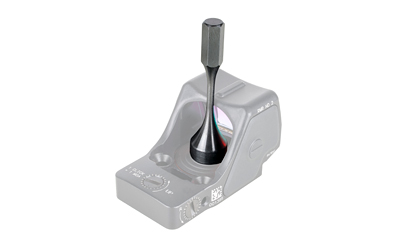
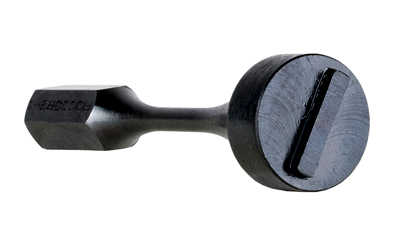
Anyone who owns a Trijicon SRO or RMR HD knows the battery cap can be a pain to work with. The slot is shallow, it sits close to the glass, and the usual improvised fixes like a quarter or the edge of a flathead tend to slip, cross the threads, or leave marks you can't buff out. This little tool exists to solve exactly that problem. It's shaped to seat into the cap slot and give you a straight, solid grip so the cap comes off and goes back on the way it should.
What the SRO/RMR HD Battery Cap Tool Does Right
The fit is the whole point. Because it drops into the slot cleanly, you get real leverage without the tool skating across the optic body or contacting the lens. That means fewer scratches, fewer stripped or crossed threads, and a battery change that takes seconds instead of a frustrating five minutes at the bench. It's compact and light enough to toss in a range bag or toolbox and forget about until you need it.
Getting the Torque Right With the Battery Cap Tool
One thing worth knowing: the SRO and RMR HD battery cap is meant to be snugged to no more than 9 inch-pounds. Over-tightening can actually cause electrical problems or damage the cap itself, so the goal is snug and stop, not cranked down like a lug nut. This tool gives you enough control to seat the cap properly without muscling it past where it needs to be.
If you run a top-loading Trijicon and change your own batteries, it's one of those small accessories that earns its keep the first time you use it. Keeps your optic looking clean and keeps that cap threading true for the long haul.
Key Specifications
- Manufacturer: Trijicon
- Manufacturer Part Number: AC30022
- Model: SRO/RMR HD Battery Cap Tool
- UPC: 719307624023
- Color: Black
- Finish: Matte
- Product Type: Tool
- Compatibility: Trijicon SRO and RMR HD
- Recommended Cap Torque: No more than 9 in-lbs
What’s Included
- Trijicon SRO/RMR HD Battery Cap Tool (AC30022)
Frequently Asked Questions
What optics does the SRO/RMR HD Battery Cap Tool fit?
It's built specifically for the Trijicon SRO and the Trijicon RMR HD, both of which use the top-loading battery cap. It's shaped to match that cap slot so you get a clean, secure grip. It is not designed for the standard RMR or MRO, which use different battery setups.
Why not just use a coin or a screwdriver to change the battery?
You can, but that's how most people end up with a scratched optic body or a chewed-up cap. Coins and flatheads slip easily and can cross the threads, which makes the next battery change even worse. This tool seats into the slot properly so you avoid the metal-on-metal damage.
How tight should I make the battery cap?
Trijicon recommends the SRO and RMR HD cap be snugged to no more than 9 inch-pounds. Going tighter than that can lead to electrical issues or damage to the cap and the optic's electrical system. The idea is to turn it until it's snug and then stop, not force it.
Is the tool worth keeping in a range bag?
Absolutely. It's small, light, and doesn't take up any real space, so it lives easily in a bag or maintenance kit. When your dot dies mid-session and you need a fast battery swap, having it on hand beats hunting around for a coin that fits.





Reviews
There are no reviews yet.